
How to Sign In to Your LinkedIn Account and Take It Over
October 20, 2026
BuyLinkedIn Help· Customer support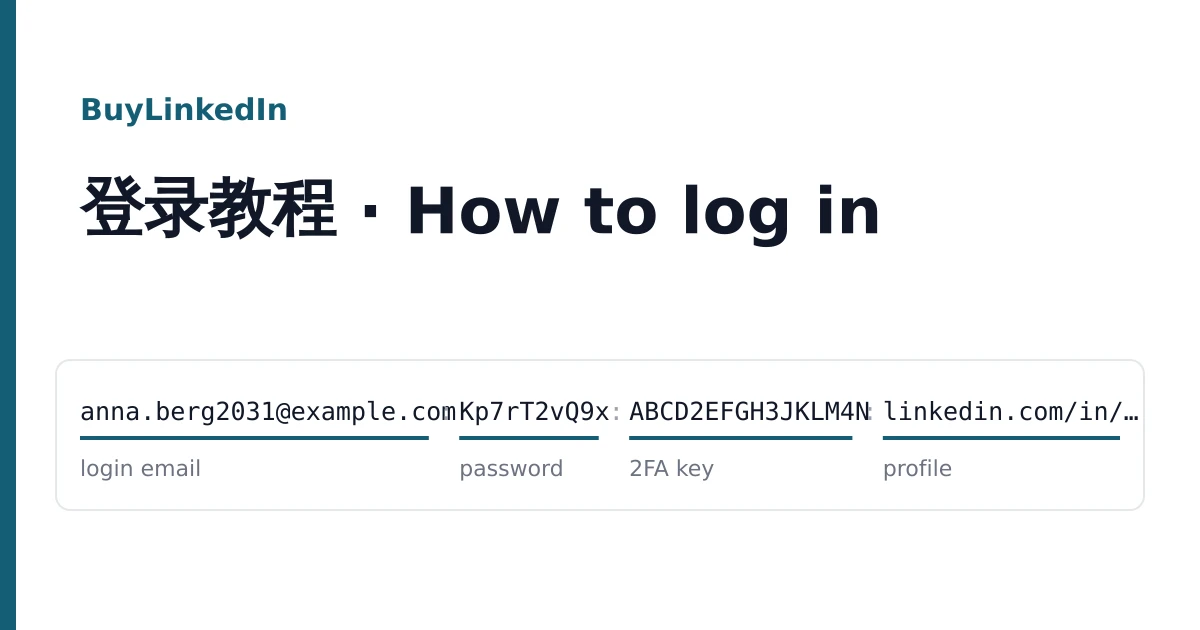
Your LinkedIn accounts are on the order page in your dashboard, one account per line, with a button to copy each line and one to download them all as a text file. The same lines come in the delivery email. Save the file somewhere only you can open: a line is enough to get into the account.
Field order is not the same on every listing, so this guide teaches you to recognise each field by its look. Once you know which part is which, signing in takes a minute.
Recognise the fields by their look
| Field | What it looks like | Used for |
|---|---|---|
| Login email | An address with @, usually the first or second field | The email box on LinkedIn's sign-in page |
| LinkedIn password | The field right after the login email | The password box; case matters |
| 2FA key | 16 to 32 capital letters and digits, sometimes in groups of four | Making the six-digit sign-in code |
| Mailbox password | A second password, after a second copy of the email | Opening the Outlook, Hotmail, Gmail or currently.com mailbox |
| Profile address | Starts with https://www.linkedin.com/in/ or just in/ | Checking which profile you have |
| User agent | Starts with Mozilla/5.0 | Information only: the browser the session was saved in |
| Cookies | A long block, often starting with [{ | Opening the saved session without the password |
Three shapes cover most deliveries (all values made up):
anna.berg2031@example.com:Kp7rT2vQ9x:ABCD2EFGH3JKLM4N:https://www.linkedin.com/in/anna-berg-2031anna.berg2031@example.com:Kp7rT2vQ9x:ABCD2EFGH3JKLM4Nanna-berg-2031|Kp7rT2vQ9x|anna.berg2031@example.com|MailPw73|Mozilla/5.0 (...)|[{"domain":".linkedin.com", ...}]Separators can be colons, vertical bars or commas. One aged listing begins with a two-letter country code before the email; skip it. If a line has a field you cannot place, ask in a ticket before you try it anywhere.
Signing in with the password and a code
- Open linkedin.com in a private window and choose Sign in.
- Paste the login email, then the LinkedIn password. Copy each field on its own so no colon or bar comes with it.
- When LinkedIn asks for a verification code and your line has a 2FA key, open https://checkkit.net/en/online-2fa-code-generator, paste the key, and type the six digits it shows. A code lasts about 30 seconds, so enter it at once.
- If LinkedIn instead says it emailed a code, read it in the mailbox (next section). If it asks for a phone number, see the problems section below.
Signing in with cookies
Lines that end with a cookie block can skip the password on the first visit. Install the Cookie-Editor extension in your browser, open linkedin.com, click the extension, choose Import, paste the whole block and confirm. Reload the page and the account's feed should appear.
A saved session ends when LinkedIn signs it out or when the password changes, so treat cookies as a way in for the first visit and keep the password and mailbox for everything after.
Open the mailbox before you change anything
On listings marked email included, sign in to the mailbox first, with the email and the mailbox password. Look for LinkedIn's messages so you know the box works. Every reset link and most security codes land there, so a working mailbox is what lets you keep the account.
The provider is named in the listing title: Outlook or Hotmail at outlook.com, Gmail at gmail.com, and AT&T addresses on currently.com at currently.com. Listings without the mailbox give only the LinkedIn login; on those, add your own email straight after you sign in.
Take the account over
Work through these in LinkedIn's Settings, under Sign in and security, one at a time:
- Email addresses: add an address you control, confirm it from the link LinkedIn sends, and make it primary.
- Change password: set a new one that only you know. This also ends saved sessions, including the delivered cookies.
- Two-step verification: turn it off and on again with your own authenticator app, so the delivered key stops working. Store the new recovery codes in a password manager.
- Where you're signed in: end any session you do not recognise.
If you change the name, photo or headline, use details that are true for whoever will use the account. LinkedIn's User Agreement does not allow accounts to be transferred and can ask any account to verify itself; use it within those terms. We give no advice on getting around LinkedIn's checks.
Problems and how to report them
"That's not the right password"
Copy the password field again, alone, and check you used the login email rather than the profile name. Try twice at most; repeated failures can lock the account for a while.
LinkedIn asks for a phone number
Some listings say in the title that an SMS check may be needed, and are sold on that basis. If yours did not say so, stop and report it rather than adding a number you do not want tied to the account.
"Your account has been restricted"
Take a screenshot of the notice before clicking anything.
Reporting
Open a ticket from the order page within the warranty window on the listing. Give the login email of the affected line, what you tried, and the screenshot. Signing in never voids the warranty; restrictions after bulk invitations, mass messages or scraping tools are not covered. To compare listings for your next order, see the catalogue and the home page.